Activity log
See who did what and when in your workspace, including before-and-after values for important changes.
#What the Activity log is
The Activity log is an audit trail. It records important actions in your workspace so you can answer questions like "Who voided this bill?", "Who changed this product's price?" or "Who gave this user a new role?"
It is included in the Business plan (and in trials that include Business features). If you do not see Activity log under Administration, your plan does not include it or your role does not have the View audit permission. See Plan and billing.
#Open the log
Go to Administration → Activity log. The newest entries come first, 25 per page.
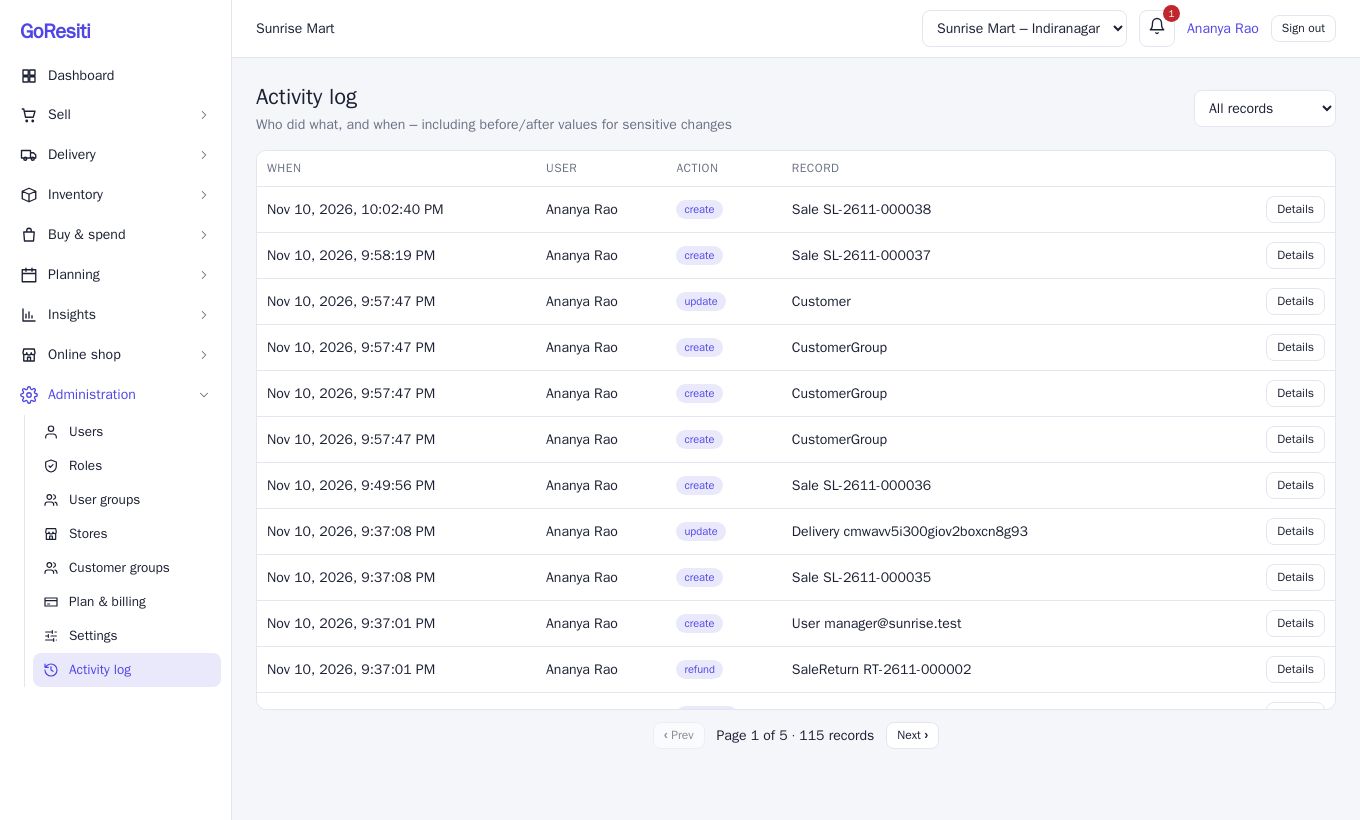
Each row shows:
- When: the date and time.
- User: the person who did it, or "system" for automatic actions.
- Action: such as create, update, void, refund, payment, receive, open or close.
- Record: the type of record and its reference, for example a sale invoice number or a product.
#See what changed
When an entry has before-and-after values, a Details button appears. Click it to open Change details, which shows the Before and After side by side. This is useful for changes like a user's role or a store's GSTIN.
#Filter the log
Use the dropdown at the top right to show one kind of record at a time. All records shows everything. The other choices are: Sale, SaleReturn, Purchase, Product, User, Role, Store, Settings, Expense, Adjustment, Transfer, StockCount, RegisterSession and GiftCard.
#What gets recorded
The log covers actions such as:
- Sales: voiding, payments received, emailing, SMS or WhatsApp sent to a customer.
- Returns and refunds.
- Purchases: creating, editing, receiving, cancelling and paying.
- Products: creating, editing, archiving and image changes.
- Stock: adjustments, transfers (sent, received, cancelled) and finalised stock counts.
- Register sessions opened and closed.
- Expenses, gift cards, deliveries and notifications.
- Users, roles, user groups and stores: created, edited or deleted.
- Settings changes and logo changes.
- Backups started, downloaded and deleted.
- Password changes.
Entries cannot be edited or deleted from the screen.